
Lab 11: Animal Fluid Balance: Osmoregulation
Overview
For the biochemical reactions in cells to proceed properly, the optimal conditions of the internal environment of the cells must be maintained. The cell membrane forms the barrier that separates the internal environment of the cell from the external environment. The membrane maintains the balance of fluid gained and lost by the cell so that any fluctuations in the osmotic and ionic conditions in the cell are minimized, and reactions can proceed normally.
Animals living in the ocean are exposed to an external environment that has minimal fluctuations in osmotic and ionic conditions. These relatively constant conditions in the external environment, coupled with the similarity of the internal environment to the chemical composition of seawater, make the maintenance of the internal environment of these animals relatively simple.
Animals living in freshwater are exposed to an environment with low concentrations of ions and a high concentration of water. In this type of environment, cells lose ions and take on water. Animals have developed mechanisms that remove water and retain ions to prevent cells from swelling and bursting.
Conversely, animals living in air are exposed to a very harsh environment with a low concentration of water. Without proper levels of water, cells can dehydrate and shrink. In this environment, animals have developed mechanisms that conserve water and remove excess ions.
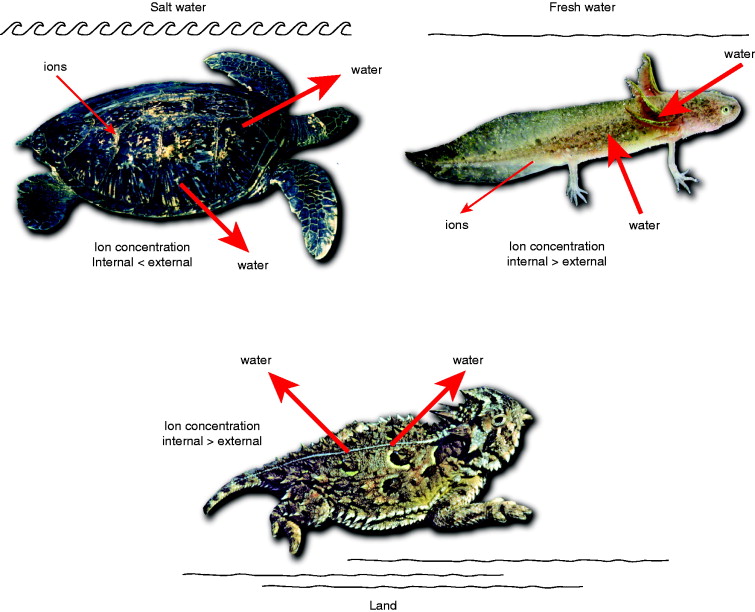
The pioneer French physiologist Claude Bernard described the internal fluid of plasma and extracellular fluid that bathes most of the cells in our bodies as the milieu interieur. In order to maintain this solution at near constant conditions, organisms use many different processes, which are encompassed by the term homeostasis. In most cases, healthy organisms use a negative feedback mechanism that quickly detects any changes in their internal conditions and corrects the internal environment before drastic changes to their cells occur.
Background
Sodium is the predominant cation in the extracellular fluid of multicellular animals. The high level of sodium ions in seawater results in minimal osmotic stress in many marine organisms. In these animals, therefore, minimal ionic and osmotic regulation is required. Furthermore, the large volume of water in the ocean ensures minimal fluctuations of the osmotic environment.
Some marine organisms do not spend all of their time in the ocean. Some live in the intertidal region where they experience periods of drought, while others may live in tidal pools. In the latter case, the relatively small volume of water in the tidal pool may result in fluctuations in the osmotic environment. The level of sodium in the pool may increase when the sun evaporates water or decrease when freshwater is added through rain or a river. Thus, animals that are trapped in a tidal pool must be able to adapt to short-term osmotic stress and survive for about 12 hours until the next tide.
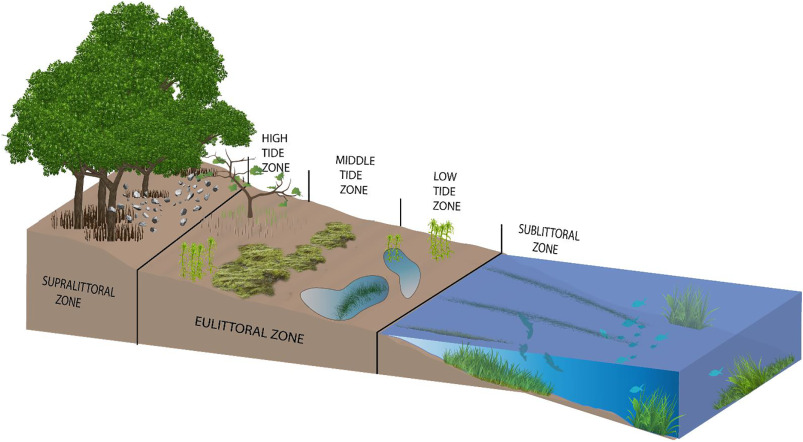
In this laboratory, you will use a series of dilutions of seawater (with deionized water) to measure the effects of solute concentration on the movement of water into or out of an aquatic worm or slug. You will place a worm in each solution and then measure its weight change every 10 minutes for one hour.
Learning Goals for this Experiment:
- Students will weigh and observe polychaete worms in different marine salinity dilutions and compare these with fiddler crabs..
- Students will understand the correlation between saline concentration and osmoregulation in marine organisms and fiddler crabs.
- Students will determine the iso- hypo- and hyper-tonic environments based on the loss or gain of weight due to osmosis over time across two different organisms.
Equipment Required
Computer
IWX/214, power supply and USB cable
FT-104 Force Transducer
Ring stand and clamp
Weigh boat and pennies (each weighs about 3 g)
5 x 250 ml beakers per group
2 x 100 ml graduated cylinders per group
Forceps
Marine Worms
Fiddler crabs
Artificial Seawater (see Appendix)
Large weigh boats
Electronic balance
Start the Software
1. Click on LabScribe
2. Click Settings Animal Fluid Balance Osmoregulation
The following should be already set up for you:
- The force transducer will be plugged into Channel 3 input of the IWX/214 (Figure FB-1).
- The transducer will be attached to a ring stand using a 90˚ clamp, so that the transducer is horizontal.
- A weigh boat will be attached to the end of the transducer arm via thread (Figure FB-2).
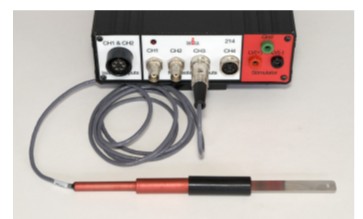
Figure FB-1: The force transducer is connected to Channel input of the IWX/214.
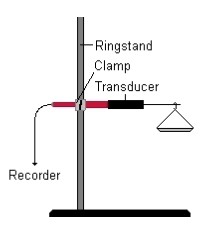
Figure FB-2: Equipment setup to record weight placed in a weigh boat.
Experiment FB-1: Osmoregulation
Calibration of FT-104 Force Transducer
Aim: To calibrate the force transducer used to measure weight gain or loss of the animal.
Approximate Time: 15 minutes
Procedure
1. Turn on the iWorx box.
2. Type “No Weight” in the Mark box to the right of the Mark button. Click the Record button, and press the Mark button to the left of the mark box. Record for ten seconds with no weight hanging from the arm or hook of the transducer.
3. Count the number of pennies you have and multiply their number by three (the weight of a penny in grams).
4. Type the weight of the pennies in the Mark box. Place the pennies on the weight pan and press the Mark button. Click the AutoScale button next to the channel title area. Record for ten more seconds (Figure FB-3).
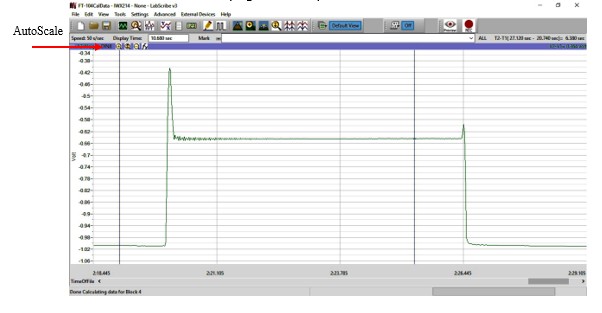 Figure FB-3: Recording of different known weights used to calibrate FT-104 force transducer.
5. Click Stop to halt the recording.
6. Select Save As in the File menu, type a name for the file. Click on the Save button to save the data file.
7. Remove the pennies from the weight pan.
Units Conversion
1. Scroll to the beginning of data when no weight was attached to the force transducer.
2. Use the Display Time icons on the LabScribe toolbar (Figure FB-4) to adjust the Display Time of the Main window to show the complete calibration data on the Main window. The required data can also be selected by:
• Placing the cursors on either side of data required.
• Clicking the Zoom between Cursors button on the LabScribe toolbar to expand the complete calibration data to the width of the Main window.
3. Click the Double Cursor icon so that two cursors appear on the Main window. Place one cursor on the flat section of data collected when no weight was attached to the FT-104, and the second cursor on the flat section of data collected when the pennies were attached to the transducer.

Figure FB-4: The LabScribe toolbar
4. To convert the output of the force transducer from a voltage to the grams of force:
• Click on the arrow next to the title of the Weight channel to open the channel menu.
• Select Units from the channel menu and Simple from the submenu.
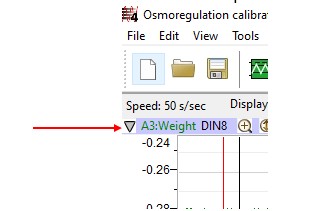 5. The Simple Units Calibration window will appear (Figure FB-5). On this window:
• Select 2 point calibration from the pull-down menu in the upper-left corner of the window.
• Put a check mark in the box next to Apply units to all blocks.
• Notice that the voltages from the positions of the cursors are automatically entered into the value equations.
• Enter zero in the corresponding box to the right of the voltage recorded when no weight was attached to the transducer. Enter the weight of the pennies in the box to the right of the corresponding voltage recorded when the weight of the pennies was hung on the hook of the transducer.
• Enter the name of the units, grams, in box below the weights. Click on the OK button in the lower right corner of the window to activate the units conversion.
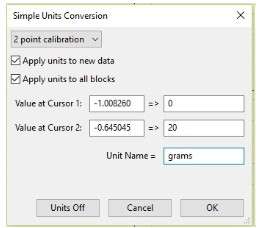
Figure FB-5: The Simple Units Conversion dialogue window with the voltages at the cursors set to equal the weight used in calibration.
Practice Weighing Technique
Aim: To develop a consistent technique of weighing a worm.
Approximate Time: 15 minutes
Procedure
1. Use forceps to remove a worm from seawater. Blot the worm with paper towels to remove excess water.
2. Type No Worm in the Mark box to the right of the Mark button.
3. Click the Record button to record a baseline of ten seconds while only the weight pan is attached to the transducer. Continue recording.
4. Type Worm in the Mark box and mark the recording. Place the worm on the weight pan attached to the transducer.
5. Continue to record for ten seconds after the worm was placed on the weight pan. Click Stop to halt the recording.
6. Replace the worm in the seawater.
7. Repeat Steps 1 through 6 for two other worms.
Data Analysis
1. Scroll through the data file to the weighing of the first worm.
2. Use the Display Time icons to adjust the Display Time of the Main window so that the output of the transducer before and after the worm was placed on the weight pan is displayed on the Main window.
3. Data can be collected from the Main window or the Analysis. If you choose to use the Analysis window, click on the Analysis window icon in the toolbar.
4. The mathematical functions, V2-V1 and T2-T1, should be showing. The values for these parameters are displayed on screen.
5. Maximize the height of the trace on the Weight Channel by clicking AutoScale All from the toolbar.
6. Place the cursors on the recording before and after the addition of the worm to the weight pan. The value for V2-V1 on the Weight channel is the weight of the worm.
7. The weight of the worms can be recorded in the on-line notebook of LabScribe by typing their names and values directly into the Journal.
8. The functions in the channel pull-down menus of the Analysis window can also be used to enter the name and value for V2-V1 from the recording to the Journal. To use these functions:
• Place the cursors at the locations used to measure the weight of the worm.
• Transfer the name of the mathematical function used to determine the weight to the Journal using the Add Title to Journal function in the Weight Channel pull-down menu.
• Transfer the weight to the Journal using the Add Ch. Data to Journal function in the Weight Channel pull-down menu.
9. Repeat Steps 2 through 8 to find the weights of the other two worms weighed in this exercise. Record the weights in the Journal and on Table FB-1.
10. Select Save in the File menu.
Osmoregulation
Aim: To measure changes in the weights of five (5) worms and five (5) fiddler crabs placed in different osmotic environments.
Approximate Time: 30 minutes
Procedure
1. Use forceps to remove a worm from seawater. Blot the worm with paper towels to remove excess water.
2. Type No Worm in the Mark box to the right of the Mark button.
3. Click the Record button to record a baseline of ten seconds while only the weight pan is attached to the transducer. Continue recording.
4. Type Worm 1 in the Mark box. Place the worm on the weight pan attached to the transducer. Press the mark button to mark the recording.
5. Continue to record for ten seconds after the worm was placed on the weight pan. Click Stop to halt the recording. Note the time when the worm was weighed.
6. Record the weight of the worm in the Journal and on Table FB-2.
7. Place the worm in the 100% seawater (or appropriate environment) solution.
8. Repeat Steps 1 through 6 for each of the four other worms used in this exercise. Each worm goes into a different solution: 90, 80, 70, or 60% seawater.
9. Every ten minutes, remove each worm from its solution. Blot the worm, weigh it, and return it to the same solution.
10. Record the weight of the worm in the Journal and on Table FB-2.
11. Weigh all the worms until you have seven weight values for each worm.
Obtain the initial weight of the fiddler crab using the electronic balance. Make sure to tare the weight of the weigh boat.
Using the same seawater concentrations, place the fiddler crabs in them for 10 minutes and then record their weight again using the electronic balance.